
Subscription planning · 25 October 2026
IPTV Subscription Renewal Checklist: Check the Price Before You Pay
Before renewing IPTV, compare the next charge with what you actually need now: the same plan, the right number of simultaneous streams and the correct billing period. An introductory price or old order confirmation may not describe your next payment.
Commercial disclosure: This site promotes services connected with its publisher. The examples below are hypothetical budgeting exercises, not current quotations, independent service tests or promises about any provider.
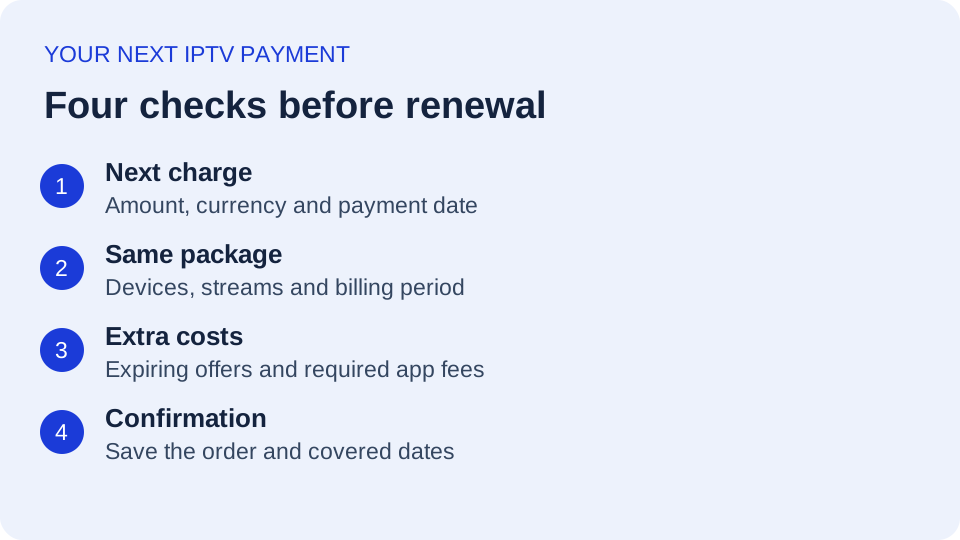
Start with the next payment, not the old advertised price
Open the account through the provider's official website and locate the current subscription or renewal notice. Record the package name, billing currency, amount, due date and whether payment happens automatically or requires a new order. Ask support if the account screen does not state one of these details.
Keep three dates separate: the date you paid last time, the date current access expires and the date another charge is scheduled. They may coincide, but do not assume they do. If cancellation or a plan change requires notice, identify that deadline as well.
Use the subscription price comparison to organize a shortlist, then verify today's renewal amount directly. A comparison page is not your invoice.
Match the renewed package to your household
Count the screens that need to play together, rather than every device where an app is installed. A household might have four devices but normally use only two at once. Confirm that the renewed package allows the actual playback pattern, including any network or location restrictions.
Also check what changed since the first purchase. Did you replace a television, move home, stop watching a language package or add another viewer? A more expensive renewal can sometimes reflect a different configuration, while an apparently cheaper offer might remove something you still use.
The household buying guide helps separate simultaneous streams from installed devices. For playback issues across several TVs, check the multi-TV bandwidth guide before paying for more account connections; a larger allowance does not repair weak Wi-Fi.
Calculate the total cost for the same period
Write down the subscription charge plus any required player licence, additional-stream charge and other disclosed mandatory fees. Keep optional extras separate. A one-time player purchase should not be counted again at every renewal unless there is actually another charge.
Comparison formula: total scheduled cost for the period ÷ number of months covered = effective monthly cost. This is a budgeting comparison, not necessarily the monthly amount the provider charges.
| Option | Calculation | Total |
|---|---|---|
| Monthly, unchanged price | $18 × 12 | $216 |
| Annual prepayment | One payment of $144 | $144 |
| Annual plus required yearly app fee | $144 + $12 | $156 |
In this invented example, the third option averages $13 per month, but requires $156 over the stated period. That does not establish the better purchase: prepayment commits money earlier, future suitability is uncertain, and cancellation or refund conditions still matter. Replace every number with your own confirmed charges. If monthly prices can change, the first row is only a scenario, not a guaranteed yearly total.
Look for the end of an introductory offer
Check whether a coupon applied only to the first invoice, whether a free extra connection expires and whether the renewal uses a different base price. Ask for the final renewal amount in writing if the notice only says “standard rate.” Do not rely on a coupon still being displayed on a public landing page.
The FTC's subscription guidance advises checking renewal costs, understanding cancellation instructions and retaining records. Contact the business through a known official route when a notice seems unexpected, rather than providing payment information through an unfamiliar message.
Clarify upgrades and downgrades before creating another order
A new order might renew the existing account, create a separate account or start a different billing period. Ask which applies before paying. Also ask whether unused access is preserved, whether credentials change and whether a price adjustment is available. None of these outcomes should be assumed from an “upgrade” button alone.
If you are reducing the number of screens, confirm when the lower limit takes effect. If you are adding screens, ask whether the advertised charge covers the remaining term or starts a new full term. Save the answer with the updated invoice.
A renewal question you can send
Please confirm the next total charge and currency for my current package, its billing period, and the permitted simultaneous streams. Is any introductory offer ending? Will payment renew the same account, and will the existing expiry date or credentials change? Please also confirm whether renewal is automatic and where I can change or cancel it.
Make one of three clear decisions
- Renew: the written terms, setup and total cost still fit your needs.
- Change the package: the service still fits, but you need a different allowance or term; obtain confirmation before ordering.
- Do not renew: follow the documented cancellation process where applicable and keep confirmation. Deleting the player is not a substitute for checking billing.
After the decision, save the order reference, amount, covered dates and confirmation in one place. Check that the account reflects the intended package. If anything differs, contact the seller promptly with the order reference; do not share passwords or payment details in public messages.
Review current options without losing track of your renewal
If you are considering TereaTV, check its current checkout options and confirm the package terms before paying. This is a commercial option we promote, not a claim that its offer will be cheaper than your current service. Keep any existing renewal separate until you have deliberately decided what to do with it.
Check current TereaTV checkout options
Frequently asked renewal questions
Will my original discount apply again?
Only if the offer's current terms say so. Verify the renewal notice or ask the seller for the final amount.
Does paying a new invoice stop the old subscription?
Not necessarily. Confirm which account and billing period the order changes, especially when moving to another service.
Should I renew early for a discount?
First confirm when the new term begins, what happens to remaining access and which cancellation conditions apply. Compare the commitment as well as the advertised saving.