
Buying for one viewer · USA
IPTV for One Person: Choose a Single-Screen Plan Without Unused Extras
By Best IPTV USA editorial team · Published 2 November 2026
If you watch alone, a larger IPTV package can mean paying for connections you never use. But the cheapest advertised plan is not automatically the right one either. Match the account rules, player, viewing location and full checkout cost to your actual routine before choosing a subscription.
Ownership disclosure: this website promotes related services. Commercial links are not independent rankings or evidence of a provider's performance. The examples below are hypothetical buying scenarios; no provider price, device allowance or trial entitlement is assumed.
Quick answer: is one IPTV connection enough for one person?
One permitted simultaneous stream can fit a person who watches on only one screen at a time, provided the plan also permits their devices and location. It may not cover a recording session, picture-in-picture use or playback left running on a second device. Ask how those activities are counted before relying on a one-connection label.
Start with a viewing routine, not a package name
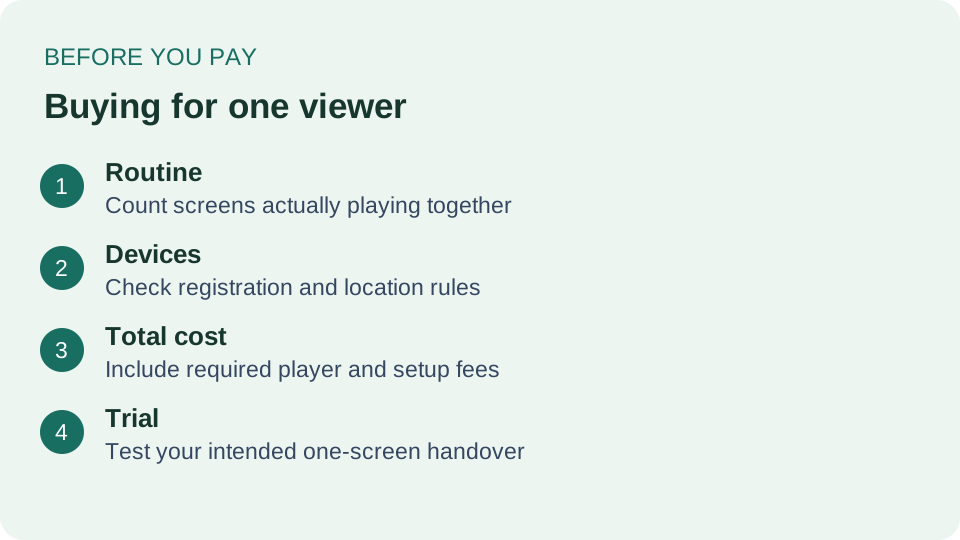
Write down where and how you watch during a normal week. Perhaps you use the living-room TV in the evening and a tablet at breakfast, with no overlap. Or you watch a match while another programme continues in a second room. Both involve one person, but their active playback needs differ.
Hypothetical example: Sam uses a TV at night and a tablet the next morning. That routine calls for one active screen at each moment, but it still requires confirmation that the account may be registered or used on both devices. If Sam starts the tablet before stopping the TV, the overlap could exceed a one-stream allowance.
Make a list of essential features too: readable captions, a usable guide, the specific permitted content you want and remote navigation. Buying fewer connections should not mean accepting a plan that cannot run on your actual device. A single-screen plan that fails the basic compatibility check is not a saving.
Separate devices, streams and location
- Registered devices: how many devices may hold or use the account.
- Simultaneous streams: how many permitted playbacks may run at the same time.
- Location rules: where the subscription may be used, including any household or regional restrictions.
These are different limits. As an example from a separate service, Netflix's device guidance distinguishes using devices from the simultaneous-screen limit set by a membership plan. That example illustrates the distinction only; Netflix's rules do not establish the terms of an IPTV seller.
Ask the seller for the terms of the exact package in your cart. A headline about multiple devices may describe installations rather than concurrent playback. Do not infer permission to share an account across addresses, even if you personally use both locations. Get clarification before paying.
Compare the cost you will actually pay
Start with the subscription charge for the selected term. Add any required player license, activation charge, tax shown at checkout, extra connection or hardware purchase. Separate one-time costs from recurring ones and verify the displayed currency. A low monthly equivalent is not the same as a low upfront payment.
Use this simple worksheet for each offer: selected term, permitted streams, supported device, subscription total, required app cost, other mandatory charges, and next renewal amount. Leave an unknown item unresolved and ask the seller; do not silently treat it as zero. Our subscription price comparison guide helps organize quotations consistently.
For a single viewer, an additional connection is worth considering only when it addresses a real need. Ask whether you can add it later and what that change would cost. An advertised upgrade is not automatically prorated, and unused time is not automatically refunded. Avoid making the decision around an assumed future discount.
Test one-screen handover during a trial
If a trial is available, confirm its duration, eligibility, device rules and whether payment follows. Use your normal player and network. Test the screen you intend to use most rather than judging the service from somebody else's demonstration. A short session cannot establish long-term reliability, but it can expose an obvious mismatch.
- Start permitted playback on your main device and check navigation, captions and guide times.
- Stop playback fully before moving to another permitted device.
- Check whether the second device signs in and plays without an account-limit message.
- If an error appears, note the time, exact wording and app version, then ask support how sessions are released.
- Confirm any required player payment before the trial ends.
Do not deliberately exceed the plan limit to see whether it is enforced. If you need to test more than one simultaneous screen, request a trial with that allowance. The purpose is to check the package you intend to buy, not to bypass its restrictions. Our USA trial guide covers the broader pre-payment checks.
When a bigger plan makes sense
An extra stream may be useful if another household member regularly watches separately, or if the seller confirms that a feature you need consumes another connection. Write down the scenario first. If it happens only occasionally, compare the permitted upgrade options and total cost instead of automatically paying for the largest package for a year.
If your household expands, revisit the family-plan checklist. That decision includes concurrent viewing and household controls, which are different from optimizing a subscription for one adult. Neither the number of people nor the number of installed apps alone tells you the correct plan.
A focused question to send before buying
I normally watch one screen at a time and may alternate between my television and tablet. Does this exact package permit both devices without overlapping playback? Please confirm the supported player, any separate app charge, location rules, trial conditions, full payment total and the process for adding a connection later.
For a commercial option to investigate, visit TereaTV for current plans and supported-device information. Compare the written answer with your routine before ordering. We do not claim that a named package currently includes every feature in this checklist. Before paying again later, use the renewal checklist rather than assuming the original terms stayed unchanged.
Frequently asked questions
Does one person always need only one connection?
No. Count active playback sessions and ask how recording or other features are counted. One viewer can still create overlapping sessions.
Can one connection work on both a TV and phone?
Possibly, when the package supports both devices and permits alternating use. Confirm registration, location and simultaneous-playback rules separately.
Is the player included in the subscription price?
Not necessarily. The player may be a separate product with its own license. Ask for the total required setup cost.
Should I buy an annual plan because I watch alone?
Being a single viewer does not determine the billing term. Consider your tested needs, upfront commitment and written cancellation conditions.
Does closing the television always release a stream?
Do not assume immediate release. App behaviour and service session handling differ; stop playback properly and ask support about recurring limit messages.
Can I add another connection later?
Ask the seller whether upgrades are supported for the selected package, when they take effect and how the price is calculated. Do not assume automatic proration.